




A trade show booth may only be on the show floor for a few days, but how you store it between events can affect its condition and how easily your team can prepare for the next show.
Frames, printed graphics, counters, monitor mounts, lighting, and small accessories may sit in storage for weeks or months. Without a quick inspection and an organized storage process, missing hardware, damaged graphics, or worn transport cases can easily go unnoticed until the next event approaches.
Good trade show booth storage does not need to be complicated. The goal is simple: protect the display, keep every component accounted for, and make sure it is ready when you need it again.
Check and Clean the Booth Before Storage
Before putting the booth into long-term storage, take a few minutes to inspect everything that came back from the event.
Check frames and structural components for visible damage, loose connections, or missing parts. Look over counters, shelves, monitor mounts, lighting, and other accessories to make sure everything returned with the booth.
Printed graphics deserve particular attention. Check for dirt, creases, tears, or damage around attachment points. Make sure graphics are clean and completely dry before storing them, and keep them separated from sharp hardware or heavy components that could damage the printed surface.
Different graphic materials may have different care requirements, so follow the recommended cleaning and storage instructions for your specific display rather than assuming every graphic can be handled the same way.
If your booth includes lighting or other powered accessories, inspect the cables, power supplies, and related components before packing them away.
Finally, check the transport cases themselves. Wheels, handles, latches, and protective padding can wear over time. A damaged case may leave the display vulnerable during the next shipment.
Finding these issues now gives you time to repair or replace something before the next event rather than discovering the problem during setup.

Keep Graphics, Hardware, and Accessories Organized
A complete trade show booth can include many small components that are easy to misplace.
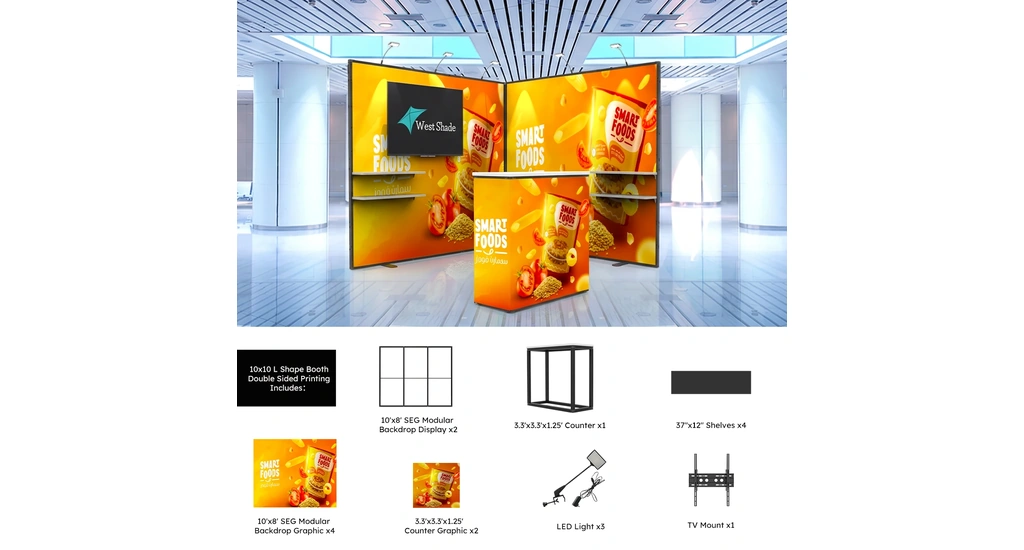
Connectors, brackets, fasteners, monitor hardware, lighting accessories, cables, and adapters should not simply be placed into whichever case has available space.
Instead, group smaller components by function. Keep monitor hardware together, for example, and place lighting and power accessories in their own labeled bags or compartments. Loose hardware should also be secured so it cannot move around and damage graphics or other components during transportation.
The same principle applies to larger cases.
Instead of labeling everything only as "Case 1," "Case 2," and "Case 3," use labels that tell your team what is actually inside:
- Backwall – Frame
- Backwall – Graphics
- Counter & Hardware
- Monitor Mount & Accessories
- Lighting & Power
Clear labeling becomes even more useful when a company owns multiple displays or sends booths to different events. The person preparing the next shipment may not be the same person who packed the booth after the previous show.
The goal is simple: someone should be able to look at the stored cases and understand what belongs to the booth without opening every case first.
Store the Display in a Clean, Protected Space
Once everything has been inspected and organized, choose a storage area that keeps the display protected until the next event.
Trade show displays should be kept in a clean, dry location where cases are protected from unnecessary moisture, dirt, and impact. Avoid placing heavy objects on graphics or display cases unless the packaging is designed to support the additional load.
Keep printed graphics protected from abrasion and crushing, structural components secured inside their cases, and electronic accessories stored according to their handling requirements.
Whenever possible, use the protective cases or packaging intended for the display. If a case is damaged or no longer protects its contents properly, replace it before relying on it for another shipment.
Accessibility matters as well. If your team attends several events each year, organize the storage area so individual cases can be identified and retrieved without moving the entire booth.
A simple inventory can make this much easier:
| Case | Contents | Condition | Action Needed |
|---|---|---|---|
| A | Backwall frame | Good | None |
| B | Printed graphics | Minor damage | Inspect before reuse |
| C | Counter & hardware | Good | None |
| D | Monitor mount | Adapter missing | Replace adapter |
Update the inventory after each event. Record anything missing, damaged, or in need of replacement so your team already knows what needs attention when the next show approaches.
If Storage Keeps Becoming a Problem, Look at the Display System
Proper storage can protect a trade show booth, but it cannot make an overly complicated display easier to manage.
If your team repeatedly struggles with too many cases, hard-to-organize components, missing accessories, damaged graphics, or a display that is difficult to move between events, the problem may go beyond storage.
How a booth is transported, packed, stored, and managed between events matters alongside how it performs on the show floor.
When it is time to update or replace your current display, consider these operational requirements as part of the decision.
WestShade offers trade show booth solutions ranging from portable displays to modular and backlit systems for different event and operational needs. A well-planned display should not only work at the event—it should also be practical for your team to manage between shows.